
Dell offers two 5K × 2K curved, ultrawide monitors that illustrate the different priorities of professional computing and gaming. The UltraSharp U4025QW (not shown) combines a 39.7-inch IPS Black panel, 120 Hz refresh rate, and Thunderbolt 4 docking capabilities. The Alienware AW3926QW (shown on the right in photo below) uses a 38.9-inch tandem OLED panel with an RGB-stripe subpixel arrangement and a 165 Hz refresh rate. Both provide 5120 × 2160 resolution, giving users substantial desktop space for development, engineering, content creation, and multitasking.
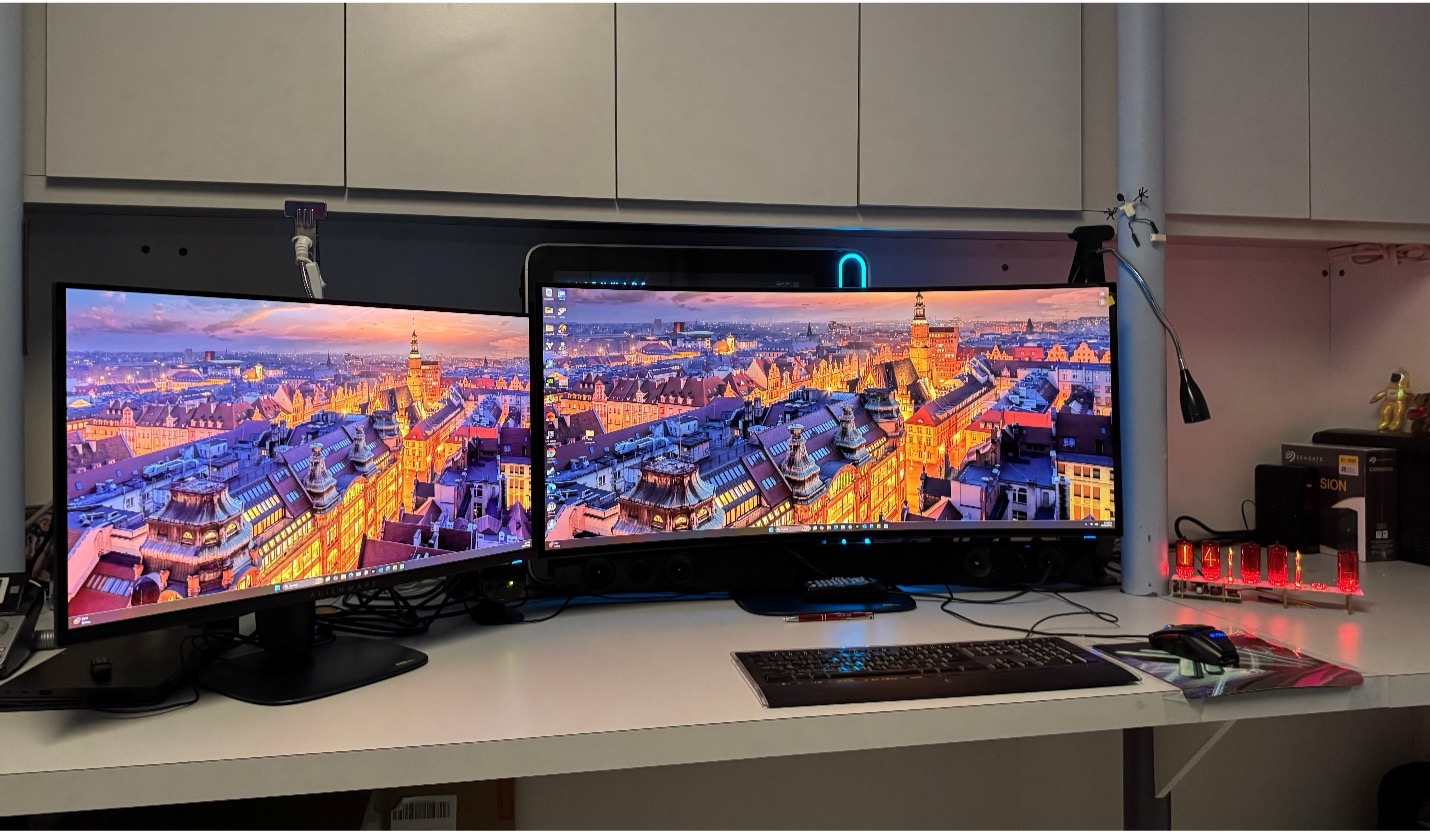
Alienware 17-inch AW2725Q, next to a 39-inch AW3926QW.
The UltraSharp U4025QW (not shown) uses IPS Black technology, which improves the contrast ratio of conventional IPS LCDs to 2,000:1. Dell combines the panel with a matte anti-glare coating, 120 Hz refresh rate, and DisplayHDR 600 certification.
The Alienware AW3926QW (shown on the right in above photo) uses tandem OLED technology, with individually illuminated pixels that deliver near-black output and high contrast. The panel supports Dolby Vision, DisplayHDR True Black 500, and a specified peak brightness of approximately 1,300 nits over a small image area.
The Alienware display also introduces an RGB-stripe subpixel arrangement. Earlier OLED configurations often produced visible color fringes around small text and high-contrast interface elements. The RGB-stripe layout addresses that problem and improves the panel’s suitability for office applications, programming environments, and document editing.
Pixel density remains similar between the monitors. The UltraSharp delivers approximately 140 pixels per inch, while the slightly smaller Alienware panel reaches approximately 143 PPI.
Both displays provide adequate resolution for detailed text and graphics. Differences in panel coating, subpixel rendering, contrast, and lighting conditions influence the perceived image quality.
Technical specifications
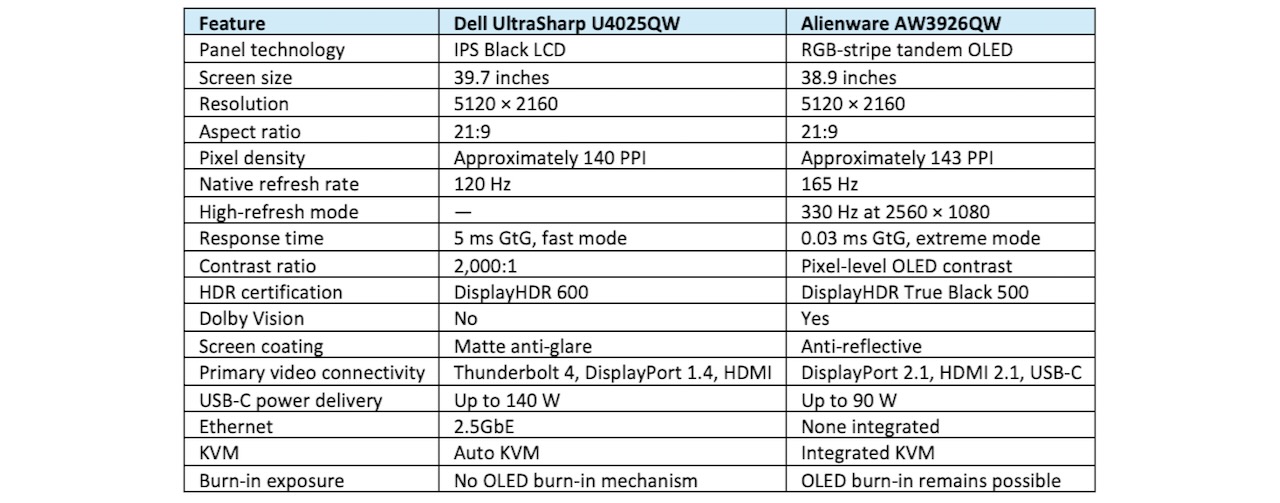
Table 1. Specifications illustrate the differences between Dell’s professional IPS Black display and Alienware’s gaming-oriented tandem OLED monitor.
OLED changes the gaming experience
The AW3926QW provides 165 Hz operation at its native 5120 × 2160 resolution. Its dual-resolution mode supports 330 Hz at 2560 × 1080, giving users the option to trade spatial resolution for higher refresh rates.
The panel’s specified 0.03 ms gray-to-gray response time reduces pixel-transition blur. Variable refresh rate support includes Nvidia G-Sync Compatible and AMD FreeSync Premium Pro.
These capabilities matter for gaming applications with rapidly changing images, particularly where frame rates exceed 120 fps.
The U4025QW supports 120 Hz operation, which provides smooth desktop interaction and adequate performance for many games. Its IPS LCD response characteristics introduce more pixel-transition blur than OLED. We reviewed the monitor when it came out in 2024.
The Alienware’s higher refresh rates also require substantial GPU performance. At native resolution, the display contains approximately 11.1 million pixels, compared with 8.3 million for conventional 4K UHD.
High frame rates at 5K2K, therefore, place considerable demands on GPU rendering throughput and memory bandwidth.
Connectivity determines workstation integration
Dell designed the U4025QW as a workstation display and connectivity hub. Its Thunderbolt 4 interface supports up to 140 W of power delivery, enabling compatible notebook systems to operate through a single cable. The monitor also incorporates 2.5GbE Ethernet, downstream Thunderbolt connectivity, multiple USB ports, and automatic KVM functionality. These capabilities simplify installations involving notebooks, desktop workstations, and shared peripherals. IT departments can reduce cable complexity and eliminate some external docking equipment.
The AW3926QW provides DisplayPort 2.1, HDMI 2.1, USB-C connectivity with up to 90 W power delivery, and integrated KVM functionality. Its connectivity supports gaming PCs and general-purpose workstations. Users who require Ethernet, additional high-speed peripherals, or more notebook charging power may need a separate docking station.
For organizations deploying hundreds of monitors, these differences affect peripheral purchasing, cabling, desk configuration, and support requirements.
OLED durability remains an operational consideration
OLED technology uses organic emissive materials whose output changes with accumulated usage. Static interface elements can create uneven aging and eventually produce image retention or permanent burn-in. Tandem OLED architecture distributes light generation across multiple emissive layers, potentially improving efficiency and panel longevity.
Dell includes three-year warranty coverage for OLED burn-in on the AW3926QW, which reduces the financial exposure associated with the technology. However, extended use of spreadsheets, development tools, taskbars, and other persistent interface elements still warrants attention to display management.
The IPS Black U4025QW does not experience OLED burn-in. This characteristic makes it suitable for long-duration operation with relatively static content, at the expense of HDR and the blackest of blacks.
Pricing introduces a substantial difference
Dell originally introduced the U4025QW in February 2024 with a US starting price of $2,399.99. The company currently lists the AW3926QW at $1,099.99.
Retail pricing for the UltraSharp varies considerably by seller, inventory, and promotion.

Table 2. US prices reflect observed listings in October 2026. Retail promotions, stock availability, and seller conditions can change transaction prices.
The Alienware’s lower price reflects different product positioning and system integration priorities. Its OLED panel offers high contrast, fast pixel response, and gaming-specific refresh modes.
The UltraSharp incorporates workstation connectivity, network integration, additional charging capacity, and an LCD panel suitable for prolonged static-image use.
The price difference, therefore, represents more than the cost of the display panel.
Text clarity: RGB-stripe OLED versus IPS Black LCD
The Alienware AW3926QW’s RGB-stripe tandem OLED panel addresses a long-standing limitation of OLED monitors: color fringing around text and other high-contrast graphical elements. Many earlier OLED panels used triangular or nonstandard subpixel arrangements that differed from the conventional red-green-blue stripe found in most LCDs. Windows ClearType and similar font-rendering systems historically optimized text for conventional RGB layouts. When these algorithms encounter different subpixel geometries, they can produce colored outlines, uneven character edges, and reduced apparent sharpness, particularly with small fonts.
The AW3926QW’s RGB-stripe arrangement improves compatibility with conventional subpixel rendering and reduces these artifacts. Its approximately 143 PPI pixel density also helps produce well-defined characters, particularly at appropriate Windows scaling settings. However, RGB-stripe geometry alone does not guarantee identical text quality to the Dell U4025QW’s IPS Black LCD. OLED and LCD panels differ in their subpixel structures, light emission, optical layers, and screen coatings. These differences influence the appearance of fine lines, character edges, and contrast transitions.
The monitors also use different surface treatments. The UltraSharp’s matte anti-glare coating diffuses reflections and supports consistent visibility under office lighting, although its surface treatment can introduce slight image grain. The Alienware’s anti-reflective surface treatment preserves strong perceived contrast, while reflections and ambient illumination can affect text visibility. Windows scaling, font size, ClearType configuration, viewing distance, and application rendering engines further influence the results.
For programmers, engineers, financial analysts, and other users who spend eight or more hours reading text, the distinction matters. The Alienware’s RGB-stripe OLED architecture narrows the historical text-quality gap between OLED and IPS LCD technology. The UltraSharp retains the predictable rendering characteristics of a conventional RGB LCD, along with freedom from OLED burn-in concerns. A definitive comparison requires controlled testing of both monitors at equivalent scaling, brightness, viewing distance, and ambient lighting conditions.
The AW3926QW’s RGB-stripe OLED panel substantially improves text rendering compared with earlier nonstandard OLED subpixel layouts, making it suitable for demanding productivity applications. Its text clarity approaches that of high-density IPS LCDs, although panel optics, coatings, software rendering, and viewing conditions can produce visible differences.
The application determines the purchase decision
Software developers, financial analysts, engineers, and content creators who spend extended periods working with static windows can benefit from the UltraSharp’s display characteristics and integrated docking functions.
The Alienware monitor addresses users who combine professional computing with gaming, video production, and HDR content consumption. Its RGB-stripe OLED panel also makes it more practical for text-intensive work than earlier OLED designs with less conventional subpixel arrangements.
For CIOs and IT purchasing teams, the evaluation should include display quality, connectivity requirements, external docking costs, warranty coverage, and expected replacement cycles.
Both monitors provide the same 5K2K workspace. Their architectural differences determine how effectively they support the applications and systems connected to them.
Setup
From the time of opening the box until the monitors lit up and displayed the opening screen was less than 10 minutes. Dell has a fantastic out-of-the-box experience—no tools needed.
What do we think?
Dell’s two ultrawides demonstrate how panel technology and system connectivity influence monitor purchasing decisions. Alienware’s offers substantial display performance at a lower acquisition cost, while the UltraSharp provides integrated workstation functions and LCD durability. Buyers should evaluate the total installed system cost, including docking hardware, expected usage patterns, warranty provisions, and replacement schedules, before selecting either display.
The days of “a monitor is a monitor” are gone forever, and Dell is offering the user a choice that suits their needs and budget.
The Alienware 39 is clearly a gamer’s dream machine.

Figure 1. The Alienware gamer’s “dream.”
You can find other reviews on systems, AIBs, and game here and here.
LIKE WHAT YOU’RE READING? INTRODUCE US TO YOUR FRIENDS AND COLLEAGUES.